Check PDF Trapped: Confirm Whether the File Is Marked Trapped, Not Trapped, or Unknown Before Press Handoff
To check PDF trapped, inspect the hidden Trapped field in the file's PDF properties or metadata view and see whether it is marked True, False, Unknown, or not set at all.
Then compare that flag with the real print workflow, because the metadata can be useful, stale, inherited, or simply wrong if nobody verified the final production copy.
That second part is what matters. The Trapped value can help you understand the print-prep story behind a PDF, but it is not a magic certificate that the file was trapped well or that every downstream press workflow will interpret it perfectly. A quick review helps you catch the awkward cases: a file that says it is trapped when the art was rebuilt later, a file that says not trapped even though prepress adjustments were already made, or a file with no reliable signal at all.
Fastest practical path: read the Trapped flag, compare it with the real prepress state, then review output intent, ICC profile, and bleed before the PDF goes to print or archive.
In a hurry? Jump to the 5-minute trapped-flag review.
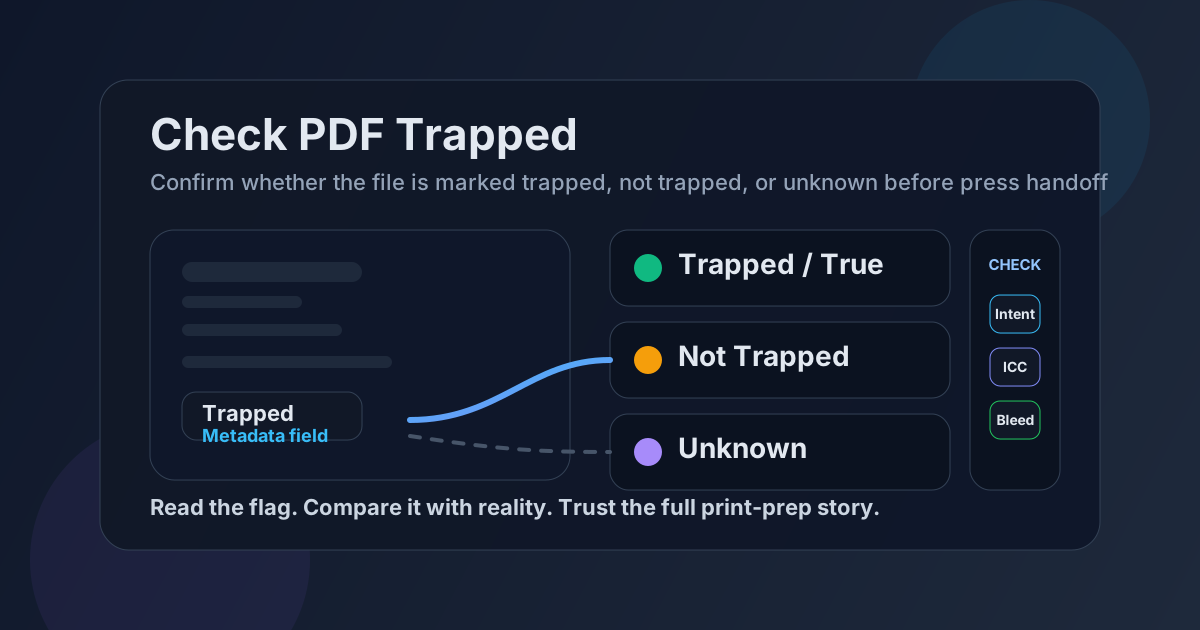
Table of contents
- Quick start: check PDF trapped in about 5 minutes
- What the PDF Trapped field actually means
- What the Trapped flag does not prove
- When the trapped flag matters most
- Step-by-step: practical trapped-flag review workflow
- Common trapped-flag problems and how to read them
- When to fix the metadata and when to leave it alone
- Related LifetimePDF tools and guides
- FAQ (People Also Ask)
Quick start: check PDF trapped in about 5 minutes
If your real goal is simply make sure this PDF's hidden trapped status is not misleading before it reaches a printer, prepress team, or archive, this is the fastest useful workflow:
- Open the exact PDF that will actually be printed, uploaded, or handed off.
- Inspect the file through View PDF Properties or another metadata-aware view and read the Trapped entry.
- Note whether the file is marked Trapped, Not Trapped, Unknown, or shows no reliable value.
- Compare that flag with the real job instead of trusting the label automatically.
- Cross-check nearby print clues such as output intent, ICC profile, and bleed.
- If the metadata is stale or misleading, fix the final copy intentionally and verify it once after saving.
What the PDF Trapped field actually means
The Trapped field is a PDF metadata entry used in print-oriented workflows. In practical terms, it tells you whether the PDF is marked as trapped, not trapped, or unknown from a prepress point of view. It is meant to help downstream systems and teams understand how the file is being described for production.
That matters because trapping is about compensating for tiny registration shifts in print. In some jobs, overlapping or adjusting neighboring colors helps avoid visible gaps when inks do not land with perfect mechanical precision. The PDF flag is not the trapping itself. It is the file's hidden label about that state.
| Trapped state | What it usually means | What you should do next |
|---|---|---|
| Trapped / True | The file is marked as trapped for production purposes | Verify the flag still fits the actual final PDF and print workflow |
| Not Trapped / False | The file is marked as not trapped | Confirm whether that is acceptable for the job or whether prepress will apply trapping elsewhere |
| Unknown | The file does not make a confident trapped-state claim | Treat the file as needing a more deliberate production review |
| Missing field | No useful trapped signal is available in the metadata | Rely on the wider workflow, not on guesswork from absent metadata |
What the Trapped flag does not prove
This is where people get burned. A PDF can be marked trapped and still be the wrong file for the press workflow in front of you. A PDF can also be marked not trapped even though the practical production process already handled that issue earlier in the chain.
It does not prove visual quality
The flag cannot tell you whether narrow color gaps, knockouts, or registration risks were actually handled well on the page.
It does not prove recency
A file may have inherited the metadata from an earlier stage even though later edits changed the production reality.
It does not replace prepress review
Output intent, ICC profile, bleed, page boxes, and the actual printer requirements still matter just as much.
That is why the smartest reading is always contextual. The Trapped flag is valuable when it matches the rest of the production story. When it clashes with the file's actual state, it becomes a warning sign rather than a reassurance.
When the trapped flag matters most
Plenty of PDFs never need this level of attention. But in the right workflow, the trapped state is worth checking before a file leaves your hands.
Commercial print jobs
Brochures, packaging proofs, labels, catalogs, and press-ready ads benefit from metadata that matches the real production decisions.
Vendor or prepress handoff
If another team will inspect your file properties, stale trapped metadata can create confusion or slow review.
Archive and compliance copies
Standards-aware environments often care that the hidden production story is coherent, not just that the pages look fine on screen.
High-risk color work
If registration, edge color, and press behavior matter, the trapped flag is one more clue you should not ignore.
On the other hand, if the PDF is just a casual reading copy, a simple office handout, or an internal preview, the Trapped field may add very little practical value. The point is not to obsess over every metadata label. The point is to care when the destination actually cares.
Step-by-step: practical trapped-flag review workflow
Here is the most useful way to check the trapped state on a real file without turning a simple review into a production rabbit hole.
1) Open the exact outgoing PDF
Do not inspect an earlier proof, a renamed export, or an attached screenshot. Metadata checks only matter on the PDF that will actually be printed, uploaded, or delivered.
2) Read the hidden Trapped field
Start with View PDF Properties or a metadata-aware PDF inspection view and read the trapped status directly. If the field is missing or vague, that is already useful information.
3) Compare the flag with the actual job
Ask a simple question: does this label make sense for the way the file was really prepared? If the PDF was rebuilt after prepress changes, inherited from a template, or exported through a different pipeline than expected, the Trapped flag may no longer be trustworthy.
4) Review nearby print signals
The trapped state should make sense alongside the file's output intent, ICC profile, bleed box, and media box. If those signals point in different directions, the file deserves a closer look.
5) Decide whether the flag is informative, stale, or irrelevant
Some jobs genuinely benefit from keeping the metadata as-is. In other cases, the Trapped field is just background noise that does not match the final production truth. Your goal is not perfection. It is an honest, coherent file.
6) Save and verify the final copy once
If you update the file or rebuild it, reopen the saved PDF one time and confirm the trapped status on the real outgoing copy. Never assume the metadata changed just because the artwork did.
Reliable sequence: inspect the Trapped flag, compare it with the real workflow, review output intent and ICC profile, then verify the final saved PDF once before handoff.
Common trapped-flag problems and how to read them
Once you start checking this field regularly, the same patterns appear again and again.
Marked trapped, but the file was rebuilt later
The metadata may reflect an earlier production stage while the final artwork or export settings no longer match that claim.
Marked not trapped, but prepress handles it elsewhere
The flag may be technically accurate for the file itself, even though another workflow stage will still handle trapping downstream.
Unknown or missing value
This does not automatically mean the PDF is bad. It means you should not pretend the metadata answered the question for you.
Metadata and print notes disagree
If the Trapped field says one thing and the handoff instructions say another, someone downstream is being asked to guess.
The right habit is not memorizing the field for trivia. It is learning to spot when the metadata story and the real workflow stopped matching each other.
When to fix the metadata and when to leave it alone
Not every Trapped flag needs intervention. Sometimes the safest choice is to leave a truthful label alone. Sometimes the safest choice is to rebuild the file rather than edit one hidden field.
Leave it alone when the flag matches reality
If the PDF's trapped state is accurate for the real workflow and the rest of the production metadata agrees, there is no prize for changing it.
Correct it when the metadata is clearly stale or misleading
If the file was inherited, repurposed, or rebuilt and the trapped flag now tells the wrong story, cleanup makes sense. Just make sure you are correcting reality, not guessing.
Rebuild the file when the production setup itself is wrong
Changing the Trapped flag does not perform trapping. If the artwork, separation logic, export settings, or prepress assumptions are wrong, the honest fix is usually a fresh production pass instead of a metadata patch.
| Situation | Best move | Why |
|---|---|---|
| Metadata matches the actual print-prep state | Keep it | The hidden file story is already coherent |
| Field is obviously inherited or out of date | Correct it | Stale metadata creates avoidable confusion during handoff |
| The artwork or workflow itself is wrong | Rebuild the file | A metadata edit alone will not make the PDF genuinely press-ready |
| The destination does not care about prepress metadata | Use judgment | Some everyday PDFs do not justify deep trapped-state cleanup |
A dependable default sequence is this: inspect the Trapped value → compare it with the real workflow → review output intent, ICC profile, and bleed → decide whether the metadata is honest → rebuild the file when the production reality, not just the label, is wrong.
Related LifetimePDF tools and guides
View PDF Properties
Start here when you want the clearest look at the Trapped field and the rest of the file's hidden document properties.
Open the guideCheck PDF Output Intent
Review the declared print destination so the Trapped flag is not being read in isolation from the wider color workflow.
Read the output-intent guideCheck PDF ICC Profile
Use this when you want the color-profile context that often matters alongside trapped-state and other prepress metadata.
Read the ICC-profile guideCheck PDF Bleed Box
Useful when the real concern is press geometry, trimming, and edge artwork rather than only one hidden metadata field.
Read the bleed-box guideEdit PDF Metadata
Helpful when the Trapped field is only one part of a broader hidden-metadata cleanup you need to finish before sharing.
Open the metadata guideRemove Metadata From PDF
Use this when the distributed version of the file should carry fewer hidden workflow details altogether.
Read the cleanup guideFAQ (People Also Ask)
How do I check PDF trapped?
Open the file properties or a metadata-aware PDF tool, read the hidden Trapped value, and compare it with the actual print or prepress workflow instead of assuming the label proves everything is correct.
What does Trapped mean in a PDF?
It is a PDF metadata flag that indicates whether the file is marked as trapped, not trapped, or unknown for production purposes. It is a hidden workflow clue, not a visual proof by itself.
Is a Trapped flag proof that the PDF was trapped correctly?
No. The flag can be stale, inherited, missing, or simply inaccurate, so it should be read together with the actual artwork, print workflow, output intent, and ICC profile.
What Trapped values can a PDF have?
In practical use, you may see the file marked as trapped, not trapped, unknown, or not set. Different software may label those states slightly differently, but the review logic is the same.
Should I change the Trapped value before sending a file to press?
Only if you know the metadata is wrong or misleading. Changing the label does not perform the trapping work itself, so if the real production setup is wrong, rebuilding the PDF is usually the safer fix.
Ready to sanity-check a print-bound PDF before it creates a prepress question later?
Best default workflow: inspect the Trapped value → compare it with the real print path → confirm output intent, ICC profile, and bleed → correct stale metadata only when it truly no longer matches the file
Published by LifetimePDF — Pay once. Use forever.