How to Check PDF Reading Order on Mac: Preview, Acrobat, and Column Jumps Before You Share
To check PDF reading order on Mac, open the final file in Preview or Acrobat, confirm it has selectable text, and compare the visual page with copied or extracted text so you can catch column jumps, sidebar detours, and header noise before you share it.
If the text comes out in the wrong sequence, or the file behaves like a scan, the safest fix is usually to run OCR first or repair the source document and export a cleaner PDF.
That is the short Mac answer. The useful answer is that a PDF can look calm in Preview, Quick Look, or Mail preview and still have broken structure underneath. On Mac, that usually shows up when a two-column report copies out in a zigzag, a sidebar interrupts the main story too early, a footer lands inside normal paragraphs, or a scanned appendix never became real text in the first place.
Fastest practical path: save the real Mac copy, confirm the text layer, compare preview with extracted text, inspect the busiest pages, and only trust the file after scans are OCRed and structural problems are fixed at the source.
In a hurry? Jump to quick start: check PDF reading order on Mac in about 7 minutes.
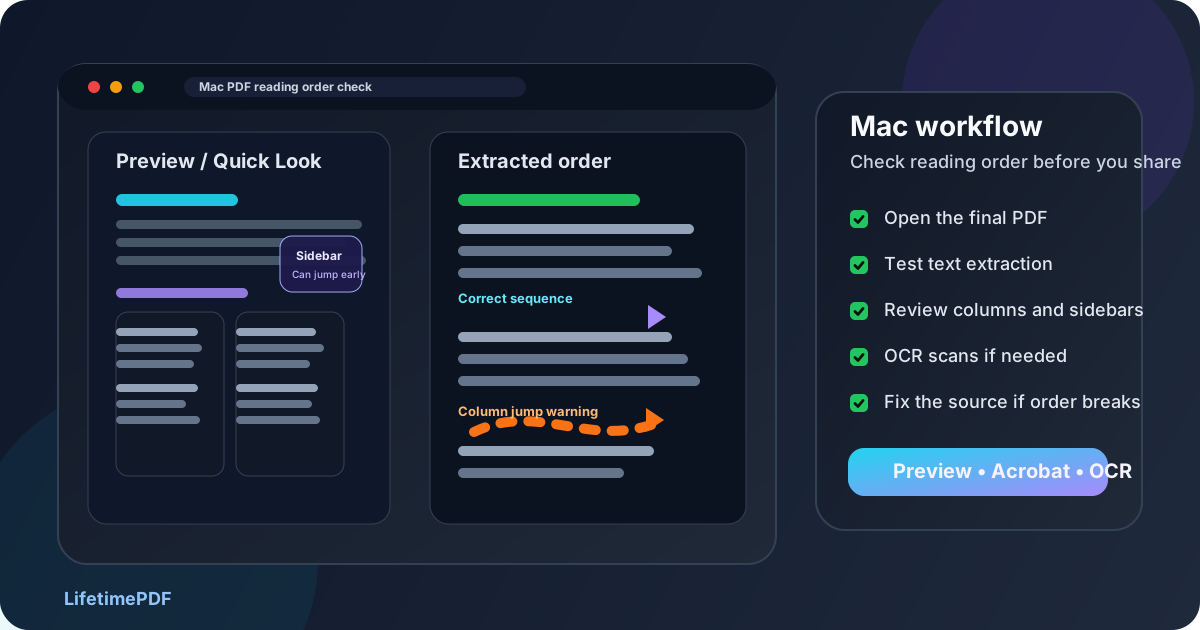
Table of contents
- Quick start: check PDF reading order on Mac in about 7 minutes
- What you are really checking on Mac
- Where Mac users get misled
- Step-by-step: how to check PDF reading order on Mac
- Fast signs that the PDF sequence is broken
- When to fix the source versus patch the PDF
- Related LifetimePDF tools and guides
- FAQ
Quick start: check PDF reading order on Mac in about 7 minutes
If your real goal is simply tell me whether this Mac PDF reads in the right sequence, use this order:
- Open the exact PDF you plan to email, upload, archive, print, publish, or AirDrop, not just a temporary preview from Mail, Messages, Safari, or Finder Quick Look.
- Try selecting text and searching for a visible word. If that fails, the file may be image-only and should be OCRed before you judge the order.
- Copy a representative section or use PDF to Text so you can compare the extracted sequence with what you saw in Preview or Acrobat.
- Check the pages most likely to fail: two columns, sidebars, tables, forms, footnotes, headers, footers, and scanned inserts.
- If the sequence zigzags, recover editable content with PDF to Word, repair the source, and export a cleaner PDF.
What you are really checking on Mac
Checking PDF reading order on Mac is not only asking whether the document looks organized on screen. The more useful question is whether the content still comes out in the same sequence a person should read it when the file is searched, copied, extracted, or heard through assistive technology.
In practice, that means looking for three things:
- Logical flow: headings, paragraphs, lists, tables, and side notes appear in the same order a reader would naturally follow.
- Stable extraction: Preview or Acrobat may look fine, but the extracted text still needs to preserve the real sequence.
- Healthy text structure: scans, OCR artifacts, floating text boxes, and design-heavy exports are not quietly scrambling the story behind the scenes.
Good outcome
The PDF opens on Mac, text is searchable, and copied or extracted content follows the same order a person would expect from the visual page.
Warning outcome
A report looks tidy in Preview or Acrobat, but extraction jumps between columns, drags a sidebar in too early, or threads headers into normal paragraphs.
Typical root cause
The source relied too heavily on visual layout, mixed content from several apps, or came from a scan that never produced a healthy text layer.
Where Mac users get misled
Mac gives you several easy ways to glance at a PDF. That convenience is useful, but it can also create false confidence. A file can look trustworthy in Preview, Finder Quick Look, Mail preview, Safari, or Acrobat Reader and still be structurally wrong underneath.
| Mac viewing path | What it is good for | What it cannot safely prove |
|---|---|---|
| Finder Quick Look or a browser preview | Confirming the file opens and that the pages broadly look right. | That the text will still come out in the correct sequence once you extract, reuse, or review it structurally. |
| Apple Preview | A strong first-pass page review when you want to inspect layouts, search text, or zoom through a multipage PDF quickly. | You still need extraction or accessibility-oriented review to prove the order is healthy beyond appearance. |
| Acrobat Reader on Mac | Useful for a second opinion on complex layouts, forms, or scanned sections. | It is still possible for a polished view to hide broken internal sequence. |
| Copied or extracted text | Revealing whether the real content sequence survives when the page design stops protecting it. | It does not explain every structural cause, but it tells you quickly whether the order is trustworthy. |
Step-by-step: how to check PDF reading order on Mac
This workflow gives you a dependable answer without turning a fast Mac check into a giant remediation project.
Step 1: Start with the final Mac copy
Review the exact file you plan to send onward. If the PDF is still living inside Mail preview, Safari preview, Messages, or a shared iCloud folder tab, save or open the real copy first. Reading-order review only matters when you inspect the same PDF that will leave your machine.
Step 2: Confirm the text layer before you judge the order
A reading-order check depends on real text. Try selecting text, searching for a visible heading, or extracting a sample with PDF to Text. If the file behaves like a picture, run OCR PDF first.
Step 3: Compare the visual layout with extracted text
This is the step that exposes most hidden trouble. Look at a page in Preview or Acrobat, then compare it with copied or extracted text. If the visible story reads left column, then right column, but the text output jumps left-right-left-right, the reading order is broken even if the page looked polished.
If you want the broader non-platform explanation too, the companion guide Check PDF Reading Order goes deeper into the underlying logic.
Step 4: Inspect the layouts that usually fail first
On Mac, these are the patterns that deserve your first attention:
- two-column reports, brochures, or newsletters,
- sidebar-heavy documents and pull-quote boxes,
- tables with nearby notes or captions,
- forms where labels and instructions sit near interactive fields,
- scanned appendices mixed into a normal text document,
- slide exports and design-tool PDFs with floating text blocks.
Step 5: Separate reading order from tab order when forms are involved
A form can have understandable text order and still have annoying keyboard focus order. Or it can fail both. If the PDF contains fields, test the text sequence and the keyboard path as two different checks. For the keyboard side, the related guide Check PDF Tab Order Online is the better companion.
Step 6: Decide whether OCR or source repair is the next move
If the file is scan-based, OCR comes first. If the text exists but the order is structurally weak, the better answer is often to recover editable content with PDF to Word, fix the source, and export again instead of endlessly patching a damaged final PDF.
Reliable sequence: final Mac copy → verify text → compare extracted order → inspect the busiest layouts → OCR scans or rebuild the source → retest the finished PDF.
Fast signs that the PDF sequence is broken
These are the patterns that usually matter in real Mac workflows, not just in theory.
| What you notice | What it usually means | Best next move |
|---|---|---|
| Copied text zigzags between columns | The layout is visually clean, but the internal sequence is not following a normal reading path. | Fix the source layout or export settings and retest extraction. |
| A sidebar appears before the paragraph it is meant to support | Floating objects or layered text boxes are interrupting the main flow too early. | Rebuild that page more structurally in the source file. |
| Headers, footers, or page numbers show up inside normal text | Page furniture is bleeding into the main content sequence. | Review the export path and strip decorative clutter from the content flow. |
| One appendix or attachment behaves like a picture | The file probably mixes text-based pages with image-only scans. | OCR the weak section, then rerun the same reading-order checks. |
| The page looks fine, but extraction feels chaotic | The visual layout is hiding weak structure. | Treat the problem as real and stop trusting the preview alone. |
Healthy default
If the PDF only feels coherent in the prettiest viewer and starts making less sense once the content leaves the page design, the reading order is not healthy enough yet.
When to fix the source versus patch the PDF
Not every Mac reading-order problem deserves the same response. The useful question is whether the PDF is close enough to healthy that a light cleanup makes sense, or whether the structure is weak enough that the source file is the only sane place to fix it.
Patch lightly or leave the PDF alone when
- the extracted text is mostly logical and only one small section is noisy,
- the file is already near the end of a workflow and the source is unavailable,
- the order issue is narrow enough that a full rebuild would be wasted effort.
Fix the source and re-export when
- multiple pages scramble columns, captions, notes, or headers,
- the PDF came from Pages, Word, Keynote, Excel, HTML, or a design app you still control,
- forms, tables, and sidebars all show structural weaknesses at once,
- the document will be published, reused, translated, summarized, archived, or audited for accessibility seriously.
My practical opinion: if the file matters to more than one person or more than one workflow, fixing the source once is usually cheaper than hoping every downstream tool guesses the intended order correctly.
FAQ
How do I check PDF reading order on Mac?
Open the final PDF on Mac, confirm it has selectable text, then compare what you see in Preview or Acrobat with copied or extracted text. If columns, sidebars, forms, or notes appear in the wrong sequence, the reading order needs work.
Can Preview or Acrobat prove that the reading order is correct?
Not by themselves. They are useful for visual review, but the stronger test is whether the content still comes out in the correct order when you extract text or run an accessibility-oriented check.
What is the fastest sign of bad reading order in a Mac PDF?
The fastest signs are copied text that zigzags between columns, side notes that appear too early, repeating headers inside body paragraphs, or one scan-heavy section that behaves like a picture instead of live text.
Should I OCR a scanned PDF before checking reading order?
Usually yes. OCR gives the file a usable text layer, which makes a real reading-order review possible instead of forcing you to judge a picture of text.
Should I fix the PDF directly or repair the source file?
If the issue is broad or repeats across several pages, fix the source file first. A clean re-export from Pages, Word, Keynote, Excel, HTML, or another editable source is usually more reliable than repeated patching of the final PDF.
Published by LifetimePDF — Pay once. Use forever.