Convert Material Requisition PDF to Excel: Extract Requisition Numbers, Material Codes, Requested Quantities, and Store Details Faster
To convert material requisition PDF to Excel, upload the requisition to LifetimePDF's PDF to Excel tool, export the XLSX, and review the requisition number, site or department, material code, requested quantity, issued quantity, unit, and store fields before using the spreadsheet.
If the requisition is scanned, image-only, or buried inside a larger stock packet, keep only the actual requisition pages and run OCR first so the spreadsheet comes out cleaner and needs far less repair.
Most people searching this phrase are not trying to admire a file conversion. They are trying to stop retyping store requests by hand, compare what a site asked for against what was actually issued, clean up inventory records, or build a worksheet that can move into costing, planning, or audit work without turning one warehouse PDF into another manual data-entry job.
Fastest path: use LifetimePDF's PDF to Excel tool, and OCR the requisition first if it came from a scan, a phone photo, or an image-only archive.
In a hurry? Jump to Quick start: convert material requisition PDF to Excel in about 5 minutes.
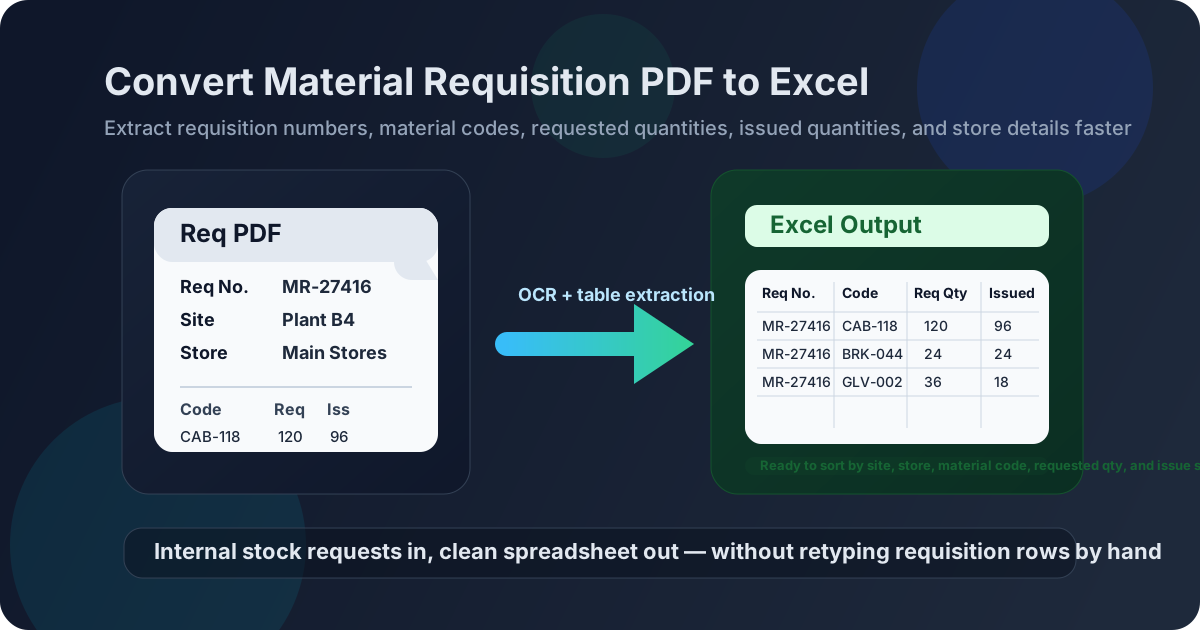
Table of contents
- Quick start: convert material requisition PDF to Excel in about 5 minutes
- Why teams need material requisition PDFs in Excel
- Why material requisition PDFs often break into messy columns
- Where requisition spreadsheets help most in real workflows
- Step-by-step: convert a material requisition PDF to Excel
- The fields worth verifying before you trust the output
- Material requisition vs purchase requisition
- Scanned material requisitions and OCR: what changes
- Excel vs CSV for material requisition extraction
- A cleanup checklist that saves time later
- Privacy and internal-stock document hygiene
- Related LifetimePDF tools and companion guides
- FAQ (People Also Ask)
Quick start: convert material requisition PDF to Excel in about 5 minutes
If the requisition PDF already contains selectable text and the layout is reasonably clean, the fast workflow is simple:
- Open PDF to Excel.
- Upload the material requisition PDF you want to extract.
- If the file is scanned or image-only, run OCR PDF first.
- Download the generated XLSX file.
- Review the requisition number, request date, site, store, item rows, requested quantities, issued quantities, and remarks before using the spreadsheet.
Why teams need material requisition PDFs in Excel
A material requisition usually records an internal request for stock, consumables, spare parts, tools, maintenance items, construction materials, or operating supplies. It can come from a production line, a maintenance team, a site office, a warehouse user, or a project crew. Humans can read the PDF easily enough because we instantly understand the difference between header fields and line items. Excel is useful because it turns that same information into something you can sort, compare, filter, and reuse.
Once a material requisition becomes spreadsheet data, you can group requests by site, requester, department, project, store, cost code, or item category. You can compare requested quantity against issued quantity, spot repeated urgent requests, identify which site keeps drawing the same items, or prepare a cleaner import for ERP, inventory, or reporting work. That is the real value behind the query convert material requisition PDF to Excel. The goal is usually not a prettier file. The goal is operationally useful data.
- Requisition number and request date
- Site, department, or project reference
- Store, warehouse, or issue location
- Material code, stock number, or SKU
- Item description, unit of measure, and remarks
- Requested quantity, approved quantity, and issued quantity
- Cost code, work order, or approval details
- Sort requests by site, store, project, or item code
- Compare requested and issued quantities faster
- Build shortage checks and recurring-demand reports
- Prepare audit schedules and stock reviews
- Reuse the data in filters, pivots, formulas, and imports
Why material requisition PDFs often break into messy columns
Material requisition PDFs look structured to humans because we can visually interpret headings, request blocks, quantities, approval signatures, and repeated table labels. A converter has to infer all of that from spacing and alignment. One requisition may contain site details, cost codes, material rows, approval boxes, issue notes, and remarks on the same page. Excel wants clean, repeated rows and columns. Many requisition forms were never designed for that.
- Digitally generated PDFs from ERP, MRP, WMS, or store systems
- Files with consistent line-item tables and readable labels
- Standardized site or stores templates used repeatedly
- PDFs with selectable text instead of scanned images
- Scanned paper forms or photographed requisitions
- Documents with handwriting, stamps, or signatures across fields
- Files bundled with issue slips, purchase requests, or approvals
- Dense layouts with wrapped descriptions or repeated headers
That is why the real win is not perfect one-click magic. The win is getting a spreadsheet that is close enough to verify in a few minutes instead of retyping every item code, quantity, and store reference by hand.
Where requisition spreadsheets help most in real workflows
Requisition data becomes more useful the moment it is no longer trapped inside a PDF. A few common cases come up again and again:
Project teams can review which materials each site requested, how demand is changing, and where shortages or repeat requests are starting to appear.
Once requests are in Excel, store teams can compare what was requested with what was issued and investigate partial issues, back orders, or frequent repeats.
Maintenance planners can tie requested spares and consumables back to work orders, shutdown jobs, or recurring equipment needs without paging through separate PDFs.
When someone needs a month of requests summarized quickly, spreadsheets beat opening dozens of static PDFs and copying lines by hand.
Step-by-step: convert a material requisition PDF to Excel
The most reliable workflow is simple on purpose. That is good news. Simple workflows are the ones teams can repeat without inventing a new process every week.
- Keep only the pages that contain the requisition. If the PDF packet includes issue slips, goods receipt notes, approvals, or email printouts, isolate the actual requisition pages first.
- Open LifetimePDF's PDF to Excel tool. Upload the requisition and let the converter focus on the pages that actually contain the request table.
- Run OCR when needed. If the file came from a scan or image-only archive, OCR first usually improves recognition of requisition numbers, item codes, and quantity columns.
- Download the XLSX output. Keep the original PDF nearby while you review the extracted sheet.
- Check the high-risk fields. Do not assume the sheet is correct just because it opened cleanly.
- Use filters and simple cleanup. Once the key rows look right, Excel becomes the easier place to sort, compare, and reuse the data.
Useful tool stack: PDF to Excel for extraction, Extract Pages for page isolation, and OCR PDF for scanned requisitions.
The fields worth verifying before you trust the output
Most extraction errors are small but expensive. A missing digit in an item code, a shifted requested quantity, or a broken site reference can travel surprisingly far before someone notices. Review the output with a checklist instead of a quick skim.
- Requisition number
- Request date or needed-by date
- Site, department, or project
- Store or warehouse location
- Requester, approver, or cost center
- Material code and description
- Unit of measure
- Requested quantity and issued quantity
- Short issue, balance, or status remarks
- Batch, bin, lot, or internal reference fields
If the extracted file will be imported into another system, this review matters even more. It is much easier to fix three shifted cells now than to unwind a wrong stock request or misleading shortage report later.
Material requisition vs purchase requisition
These two documents are related, but they are not the same thing. Knowing the difference helps you build the right spreadsheet columns after conversion.
| Document type | Usually means | Excel fields that matter most |
|---|---|---|
| Material requisition | Internal request to issue stock or materials from a store, warehouse, or site inventory | Material code, requested qty, issued qty, unit, store, site, project, remarks, issue status |
| Purchase requisition | Internal request to buy goods or services from an outside supplier | Requester, department, item description, supplier intent, estimated amount, budget code, approval status |
That difference matters because a material requisition spreadsheet is usually used for stock movement, issue planning, and internal control, while a purchase requisition spreadsheet is more about approval flow, sourcing, and spend management.
Scanned material requisitions and OCR: what changes
Scanned requisitions are still workable, but they need more respect. OCR helps convert image-only text into something the spreadsheet extraction step can read. It does not magically fix every layout problem, but it usually makes requisition numbers, site labels, item descriptions, and quantities much easier to capture.
- the material requisition was scanned from paper,
- the PDF came from a phone photo or photocopy,
- the text is not selectable,
- stamps or signatures overlap key fields, or
- the file is part of a mixed packet with inconsistent page quality.
Even after OCR, keep expectations realistic. Dense tables, handwriting, overlapping signatures, and repeated headers still need a human review. OCR improves the odds of a cleaner sheet. It does not replace checking the result.
Excel vs CSV for material requisition extraction
Both formats have a place, but they solve slightly different problems.
- a person still needs to review the output,
- you want filters, formulas, or quick fixes,
- you are comparing request data against issues or stock levels,
- another team will read the sheet before import.
- you only need plain rows and columns,
- the next step is a structured system import,
- formatting does not matter,
- someone else already defined the final schema.
For most real requisition workflows, Excel is the safer first stop because it gives you one more chance to catch broken rows before the data travels further.
A cleanup checklist that saves time later
A small amount of cleanup early often prevents a larger headache downstream.
- Delete non-requisition pages before converting if they are still mixed into the file.
- Freeze the header row so field checks are easier.
- Filter for blanks in quantity, material code, or site columns.
- Check whether repeated page headers were captured as data rows.
- Confirm that unit, remarks, or cost-code values did not slide into the wrong column.
- Review summary or approval rows separately from line items.
- Spot-check a few high-value or high-risk rows against the original PDF.
Privacy and internal-stock document hygiene
Material requisitions are internal business records, and they often reveal more than people expect. They can include project names, warehouse locations, cost codes, usage patterns, maintenance activity, stock positions, and approval paths. Treat them as real operational documents, not casual attachments.
- Upload only the pages you actually need.
- Redact anything unrelated before wider sharing.
- Remove stray approval emails or memo pages from mixed packets.
- Protect the final file if it will move outside the core team.
- Follow your organization's inventory, audit, and retention rules before sending converted output onward.
Being selective up front saves time twice: once during conversion and again when you do not have to explain why unrelated internal detail ended up in a spreadsheet that traveled too far.
Related LifetimePDF tools and companion guides
If you are building a repeatable stores or warehouse-document workflow, these tools and pages fit naturally with this exact task:
- PDF to Excel for the core extraction step.
- OCR PDF for scanned material requisitions.
- Extract Pages and Split PDF for requisition-only page ranges.
- Redact PDF and PDF Protect for sensitive internal documents.
- Convert Material Requisition PDF to Excel Online Without Monthly Fees if you want the companion guide focused on the pay-once workflow.
- Convert Purchase Requisition PDF to Excel, Convert Goods Issue Note PDF to Excel, Convert Goods Receipt Note PDF to Excel, and Convert Work Order PDF to Excel for adjacent operations workflows.
Bottom line: the best requisition-to-Excel workflow is the one that gets you a reviewable spreadsheet fast without losing the fields stores, warehouse, maintenance, and project teams actually care about.
FAQ (People Also Ask)
How do I convert a material requisition PDF to Excel?
Upload the material requisition PDF to a PDF to Excel converter, export the XLSX file, and review the requisition number, site or department, material codes, requested quantities, issued quantities, and remarks before using the spreadsheet. If the file is scanned, OCR first usually improves the result.
Can I extract data from a scanned material requisition PDF?
Yes, but the cleanest workflow is usually OCR first, then convert. Straight pages and readable scans make a noticeable difference when the requisition contains small labels, dense tables, stamps, or signatures near key fields.
Why do some material requisition PDFs create messy spreadsheets?
Because requisitions often combine request headers, site references, line items, quantity columns, approvals, and repeated page headers on the same page. Mixed layouts, low-quality scans, and extra non-requisition pages are common reasons columns shift.
What is the difference between a material requisition and a purchase requisition?
A material requisition usually requests stock or items from internal stores or warehouse inventory. A purchase requisition usually requests approval to buy goods or services from an outside supplier. One is mainly about internal issue flow, while the other is mainly about buying approval.
Is Excel better than CSV for material requisition extraction?
Usually yes if a human still needs to review the output. Excel makes it easier to filter, compare quantities, fix shifted columns, and hand the file to another team before importing the data elsewhere.