Merge PDF and TXT Files: Combine Plain Text Notes, Logs, and Supporting Pages Into One Clean PDF
To merge PDF and TXT files, the most reliable workflow is to convert the TXT file to PDF first, then use Merge PDF to combine that new PDF with the rest of your documents in the right order.
That keeps line breaks readable, avoids layout surprises, and gives you one final PDF that is easier to share, print, upload, or archive.
Most people searching this phrase are not trying to do something fancy with file formats. They are trying to finish a real packet. Maybe it is a plain-text transcript that belongs beside signed pages, a server log that supports an incident report, a notes file that should travel with a proposal, or a readme-style appendix that makes a larger PDF easier to understand. The good news is that the workflow is simple once you stop treating TXT as a finished page format. Plain text is source content. PDF is the form you use when the file should feel settled.
Fastest dependable path: turn the TXT file into PDF first, merge the PDFs in the right order, then only add page numbers, compression, or protection if the final handoff actually needs them.
Need the short version? Jump to Quick start: merge TXT and PDF files in about 4 minutes.
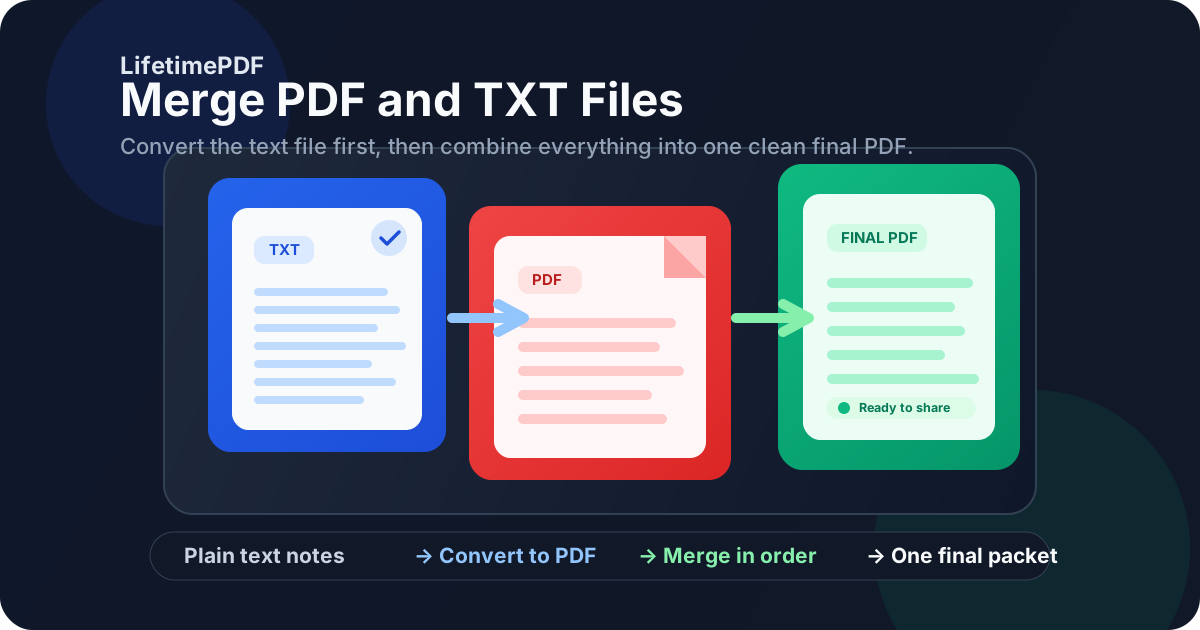
Table of contents
- Quick start: merge TXT and PDF files in about 4 minutes
- Why TXT to PDF first is the cleanest workflow
- Step-by-step: merge the files without creating a messy packet
- How to keep plain text readable after conversion
- How to order the final packet so it makes sense
- Common real-world use cases
- Troubleshooting file size, ugly wrap breaks, and awkward page flow
- Related LifetimePDF tools and companion guides
- FAQ (People Also Ask)
Quick start: merge TXT and PDF files in about 4 minutes
If the content is already finalized and you just need one clean file, this is the workflow most people actually want:
- Open Text to PDF.
- Convert the final TXT file into PDF.
- Open Merge PDF.
- Upload the new text-based PDF together with the other PDF pages, appendices, scanned pages, reports, or signed sheets.
- Drag the files into the exact reading order you want, merge them, and download the final packet.
- If the result is too large or needs easier navigation, use Compress PDF or Add Page Numbers to PDF.
Why TXT to PDF first is the cleanest workflow
A search like merge PDF and TXT files sounds simple, but there are really two different goals hiding inside it. One goal is technical convenience: push unlike files together and hope the result behaves. The other goal is communication: build one final packet another human can open, understand, and forward without confusion. The second goal is the one that matters.
| Workflow | Best when | Main tradeoff |
|---|---|---|
| Convert TXT to PDF, then merge | Logs, transcripts, evidence packets, notes, appendices, summaries, support documentation | One extra step, but far better readability and layout control |
| Try to combine mixed files immediately | Very casual internal sharing where presentation barely matters | Less predictable page flow and more chances for an awkward final packet |
In practice, merge PDF and TXT files usually means convert the text into a stable PDF, then package everything together. That is how you keep the final result readable instead of merely technically combined.
Step-by-step: merge the files without creating a messy packet
The workflow is straightforward, but doing each step in the right order prevents most of the usual problems.
1) Clean up the TXT file before conversion
Fix accidental line wraps, add blank lines between sections, and make headings or labels more obvious. A TXT file can be perfectly useful and still feel rough if it was copied from a terminal window, chat export, or raw note dump without a quick cleanup pass.
2) Convert the TXT file to PDF once
Use Text to PDF with the exact plain-text version you plan to share. This step turns the source content into stable pages so the merge is packaging, not improvisation.
3) Gather the supporting PDFs
These might include contracts, screenshots already saved as PDF, scanned exhibits, compliance forms, invoices, reports, or signed pages. Putting everything in one folder first makes the merge step much calmer and reduces accidental omissions.
4) Merge in the final reading order
Open Merge PDF, upload the converted TXT-based PDF and the rest of the PDFs, then drag them into the sequence the recipient should actually read. Reading order matters more than people expect because the packet will be experienced from top to bottom, not as a list of source filenames.
5) Review the merged packet once before sharing
- Check the first page: does the packet open with the right summary, cover page, or core document?
- Check one dense text page: are the TXT-derived pages comfortable to read, or do they need better spacing?
- Check transition points: do logs, appendices, or evidence sections begin where you intended?
- Check file size: is the packet reasonable for email, upload limits, or case files?
- Check naming: does the final filename make sense to the person receiving it?
Calmest sequence: clean the text, convert once, merge once, review once, then only number pages, compress, or protect the final packet if the workflow actually needs it.
How to keep plain text readable after conversion
Most problems in this workflow are not really merge problems. They are readability problems that started inside the TXT file itself. A merge normally preserves what it receives. If the text was chaotic before conversion, the merged PDF will preserve that chaos more officially.
Use clear section breaks
Plain text becomes much easier to read when you separate sections with blank lines, short headings, timestamps, or simple labels. This matters especially for transcripts, issue summaries, and long notes that would otherwise blur into one gray wall of text.
Keep bullets and indentation consistent
Mixed tabs, random spacing, and inconsistent bullets make plain-text pages feel rougher than they need to. Even a one-minute cleanup pass can make the final PDF look intentional instead of accidental.
Think about the reader, not just the source file
A raw terminal export may be enough for you because you already know what you are looking at. Another person usually does not. If the text is evidence, a summary, or supporting material, light formatting discipline helps the packet do its job faster.
Add page numbers for longer text-heavy packets
If the merged file is several pages long, use Add Page Numbers to PDF after the merge. That is especially useful for logs, transcripts, incident documentation, and formal appendices that may need to be referenced later.
How to order the final packet so it makes sense
The technical merge is easy. The order is where the quality shows up. Plenty of merged files are not broken, just poorly sequenced.
| If you are sending... | A strong page order is usually... |
|---|---|
| Incident or support packet | Summary page, main report, TXT-derived logs, screenshots or evidence, appendix |
| Proposal support material | Main proposal, notes or scope summary from TXT, pricing pages, appendices, attachments |
| Transcript or interview packet | Cover page, summary, transcript pages, reference materials, signed forms |
| Technical handoff | Overview, instructions, TXT-based readme or log extract, diagrams, supporting PDFs |
If the packet has one clear main document, put that first. TXT-derived pages usually work best as context, appendix, supporting record, or summary insert unless they are the actual core content.
Common real-world use cases
This keyword exists because the need is ordinary and practical. Here are the situations where it comes up most often.
Logs attached to reports
Someone writes the main narrative in PDF form, but the evidence or output still lives in a TXT file. Converting the text to PDF and merging it into the packet creates a cleaner case file for review, escalation, or recordkeeping.
Transcripts and interview notes
A transcript may begin as plain text while consent forms, summaries, or signed paperwork already exist as PDFs. One merged file is easier to share with a team, upload to a system, or archive consistently.
Plain-text appendices for formal documents
Sometimes the cleanest appendix is still plain text: a command list, raw notes, a change summary, or a small readme. Turning it into PDF before the merge keeps the packet formal without overcomplicating the content.
Support documentation and handoff packs
Teams often need to combine instructions, notes, exports, and support files into one packet. A merged PDF saves the next person from chasing separate attachments and guessing which file matters most.
If the packet is headed to a portal or inbox: merge first, then compress if needed so you are optimizing the real final file instead of guessing too early.
Troubleshooting file size, ugly wrap breaks, and awkward page flow
Most problems in this workflow are fixable without starting over.
The TXT-derived pages look cramped or messy
Go back to the plain-text source and clean it up. Add blank lines, shorten overlong lines where sensible, and make section labels clearer. The merge is rarely the real culprit.
The merged file is too large
Finish the merge first, then run Compress PDF on the combined result. That gives you a size fix based on the real packet instead of separate guesses.
The order feels wrong after download
Reopen the merge step and resequence the files by reading flow, not creation time. This is especially common when the TXT-based appendix was uploaded first even though it belongs later in the packet.
The packet is hard to cite or review
Add page numbers after the merge. Text-heavy packets become much easier to discuss when someone can say “see page 8” instead of “look near the middle of the log section.”
Related LifetimePDF tools and companion guides
This workflow works best as part of a small document toolkit rather than one heroic button. These are the most useful next steps and nearby guides:
- Text to PDF - convert TXT content into stable, readable PDF pages before the merge.
- Merge PDF - combine the converted text file with reports, forms, scans, or supporting documents.
- Compress PDF - reduce the final packet for email or upload limits.
- Add Page Numbers to PDF - make long text-heavy packets easier to reference.
- PDF Protect - add a password if the merged file contains sensitive records.
For related reading around the same topic, these guides fit naturally next: TXT to PDF, Text to PDF, Merge PDF and Word Files, Merge PDF and Images, and Best Way to Combine Multiple PDFs Into One File.
Bottom line: the smartest way to merge PDF and TXT files is pleasantly boring - clean the text first, convert it to PDF, merge in order, and hand off one final packet that reads like a finished document instead of a pile of attachments.
FAQ (People Also Ask)
1) How do I merge PDF and TXT files?
The cleanest method is to convert the TXT file to PDF first, then use a PDF merger to combine that new PDF with your other PDF files. That keeps the final packet easier to read, review, and share.
2) Can I combine a text file and a PDF into one final PDF?
Yes. Convert the text file into PDF, then merge it with the other PDF. That gives you one finished document instead of a mixed-format handoff.
3) Why should I convert TXT to PDF before merging?
Because TXT is source content, not final page layout. Converting first lets you stabilize the reading experience before you combine it with the rest of the packet.
4) What kinds of TXT files work well in this workflow?
Notes, transcripts, logs, summaries, plain-text appendices, evidence files, and lightweight technical documentation are all common fits. The workflow is especially useful when the text needs to sit beside existing PDF material.
5) What should I do if the merged file is too large?
Finish the merge first, then use Compress PDF on the final packet. That gives you a size reduction based on the real finished file rather than on scattered parts.
Ready to build one clean final packet?
Best workflow: Clean the TXT file - Convert to PDF - Merge in order - Review once - Then number pages, compress, or protect only if needed.
Published by LifetimePDF - Pay once. Use forever.