Check PDF Page Labels Online: Compare Browser Numbering with Covers, Roman Numerals, and Appendix Pages
To check PDF page labels online, open the exact PDF in a browser-based workflow, compare the reader-facing labels with the file's physical page order, and mark where covers, Roman numerals, or appendix sections change the numbering.
If the browser shows page 1 but the file position is really page 3, fix the structure first and renumber only after the final page order is settled.
That is the direct answer. The more useful answer is that page-label mistakes are subtle until they cost you time. A browser preview can make the PDF look tidy while someone on your team is citing page 12, the editor is deleting physical page 14, and the appendix starts over at A-1 without anyone noticing the shift. A quick online review keeps labels, extraction ranges, bookmarks, and final numbering from drifting apart.
Fastest path: inspect the real outgoing PDF, compare visible labels with physical page order, mark every numbering transition, then renumber only once after the structure is final.
In a hurry? Jump to quick start: check PDF page labels online in about 6 minutes.
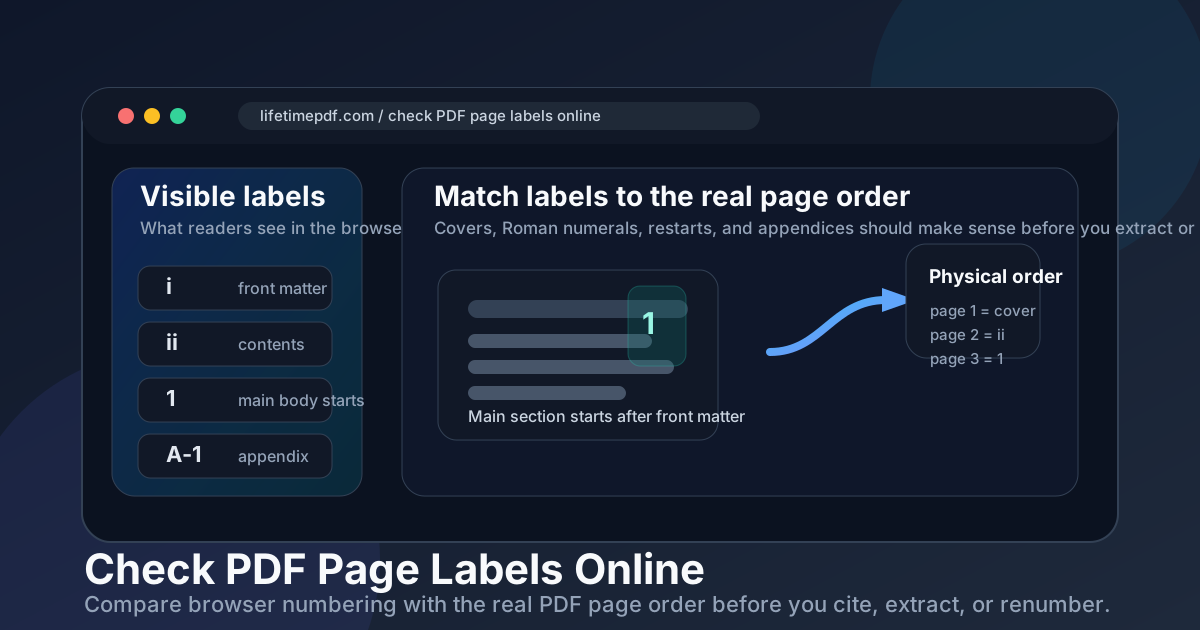
Table of contents
- Quick start: check PDF page labels online in about 6 minutes
- What an online page-label check can and cannot prove
- Step-by-step: practical browser workflow
- Where browser numbering drifts from real page order
- Common online failure patterns
- When to renumber, reorder, or leave the labels alone
- Final checklist before you cite, extract, or renumber
- Related LifetimePDF tools and guides
- FAQ
Quick start: check PDF page labels online in about 6 minutes
If your real goal is simply tell me whether this PDF's visible numbering is safe before I edit or share it, this quick workflow catches most problems fast:
- Open the exact PDF you plan to upload, email, archive, cite, or edit.
- Look at the page number box, thumbnail labels, bookmarks, or any reader-facing numbering the browser or online workflow exposes.
- Compare those labels with the PDF's physical file order: first page, second page, third page, and so on.
- Mark the first place where the visible label stops matching the physical page position.
- Note every transition, such as cover → Roman numerals → Arabic numbering → appendix labels.
- Use PDF Page Numbers only after deletions, inserts, merges, and page-order fixes are complete.
What an online page-label check can and cannot prove
A browser-first review is useful because it is quick, device-neutral, and easy to run on the exact file you are about to send elsewhere. It can reveal whether the numbering people quote in a browser still matches the actual document structure. But the preview alone is not the answer. The useful part is comparing what the browser shows with the true file order and noticing where the numbering changes on purpose or by accident.
| Online check | What it helps you prove | What it cannot safely prove alone |
|---|---|---|
| Browser page number display | What numbering a reader is likely to quote back to you first. | Whether that label equals the PDF's real physical page position inside the file. |
| Thumbnail or bookmark labels | Whether the visible numbering pattern feels logical through covers, front matter, and appendices. | Whether the underlying page order is final or still shifting after edits. |
| Comparing visible labels with file order | Where the numbering transitions happen and whether they look intentional. | Whether the file should be renumbered before you fix structural issues like duplicates, inserts, or wrong order. |
| Online renumbering tools | Whether the final PDF can be given a cleaner reader-facing numbering system. | Whether renumbering alone will fix a deeper page-order or merge problem. |
The easy mistake
People often trust the browser because the page box says 1, 2, 3 and everything looks calm. Then someone extracts the wrong section, cites the wrong appendix page, or deletes the wrong physical page because the file's internal order was telling a different story the whole time.
Step-by-step: practical browser workflow
This is the shortest workflow that gives a dependable answer before the file leaves your hands.
1) Open the exact outgoing PDF
Do not inspect an old draft, a chat thumbnail, or a different export. The page-label review only matters if it matches the file you will actually send or edit.
2) Read the visible labels first
Check the numbering a normal reader will see in the browser, thumbnails, page box, or bookmarks. That is the reference people usually quote in emails, comments, and requests.
3) Compare with the physical page order
Count the file the way the PDF stores it: first physical page, second physical page, third physical page. This reveals where the visible numbering and the true file order split apart.
4) Mark every transition point
Covers, title pages, Roman numerals, divider sheets, merged exhibits, and appendix restarts are where numbering confusion usually begins.
5) Fix structure before numbering
If the file still needs pages deleted, extracted, reordered, or merged, do that first. Otherwise you may create a numbering system for a version that is about to change again.
6) Renumber once, then verify
After the structure is final, renumber deliberately and recheck the first main page, one transition point, and the last section so the visible labels tell the same story everywhere.
Reliable sequence: open the real file → read browser labels → compare with physical page order → mark transitions → fix structure → renumber the finished PDF once.
Where browser numbering drifts from real page order
Most page-label mismatches are not mysterious. They come from a few repeat patterns that make sense to humans but confuse editing workflows if nobody calls them out.
Cover before page 1
The first numbered chapter page may be the second or third physical page in the file, even though the browser shows it as page 1.
Roman-numeral front matter
A handbook or report can legitimately use i, ii, iii before the main body begins at 1, while the file still counts those pages physically.
Merged sections
When several PDFs are combined, the page order may be correct but the visible numbering can become stale, duplicated, or misleading.
Appendix restarts
Labels like A-1 or B-3 are helpful when intentional, but they can confuse citations and extraction ranges when the transition is not obvious.
| What you notice online | What it usually means | Best next move |
|---|---|---|
| The browser says page 1, but the file position is later. | A cover page, title page, or front matter is intentionally outside the main numbering. | Mark the transition and make sure everyone uses the same reference system before editing. |
| The numbering switches from Roman numerals to normal numbers. | The document is using traditional front matter and main-body labels. | Usually leave it alone unless the switch is broken, inconsistent, or no longer matches the final structure. |
| The browser numbering looks logical, but extracts or deletes hit the wrong pages. | The editing workflow is obeying physical page order while humans are quoting visible labels. | Translate the label request into physical page positions before you edit. |
| Bookmarks, TOC references, and labels disagree. | The file was merged or edited after the navigation or numbering logic was built. | Fix structure first, then bring the labels and navigation back into sync. |
Common online failure patterns
These are the patterns that make people say, “I know the page when I see it, but the software keeps grabbing the wrong one.”
| Failure pattern | How it looks online | Better response |
|---|---|---|
| False page-1 confidence | The browser shows page 1, so everyone assumes the first numbered page is also the first physical page. | Check whether a cover or front-matter section came before it in the actual file. |
| Renumbered too early | The file looked fixed online, then later merges or deletions broke the sequence again. | Finish page-order work first and renumber only once at the end. |
| Appendix confusion | The visible labels restart with A-1 or B-1, but someone still expects one continuous sequence. | Decide which numbering system the team or recipient actually needs and make the transition obvious. |
| Mixed reference systems | Comments, bookmarks, printed footers, and browser labels are all pointing at the same page differently. | Pick one reference method for communication and verify it against the file order before you edit. |
| Stale merged packet | The document order changed, but the visible numbering still reflects an earlier version. | Repair the packet structure first, then rebuild the numbering logic on the final PDF. |
Strong opinion
If the file is headed to a client, court filing, board packet, manual, or archival system, sloppy page-label logic is not a cosmetic issue. It wastes time, causes bad citations, and makes a finished-looking PDF feel unreliable.
When to renumber, reorder, or leave the labels alone
Not every numbering mismatch needs repair. Some differences are intentional and genuinely helpful. The question is whether the visible labels still support the job the PDF is about to do.
Renumber when
- the visible numbering no longer matches the final page order
- people are citing, extracting, or deleting the wrong pages
- the merged packet changed and the labels became stale
- appendix or front-matter transitions are confusing rather than helpful
- the file is leaving your team and needs to be easy for strangers to trust
Leave the labels alone when
- Roman numerals or appendix labels are intentional and consistent
- the visible numbering already matches how readers cite the document
- the file is historically archived and the odd numbering reflects the source record
- the problem is really page order or printed footer numbers, not label logic
- changing the labels would break an established reference system people rely on
In short, fix confusion, not harmless complexity. A PDF can legitimately use several numbering styles. It just should not surprise the next person who needs to extract, cite, merge, or review it.
Ready to clean it up? Reorder or trim the file first, then apply final numbering once so the browser labels, page references, and actual file structure all agree.
Final checklist before you cite, extract, or renumber
Before the file leaves your hands, run this short checklist:
- Did you inspect the exact final PDF instead of an older copy or preview?
- Do you know the difference between the visible browser labels and the file's physical page order?
- Did you find every transition point where numbering changes format or restarts?
- If editing is next, did you confirm whether your tool expects physical page positions rather than reader-facing labels?
- Did you fix page order issues before attempting to renumber?
- After any changes, did you recheck the first main page, one transition page, and the last section?
You do not need a forensic audit. You just need enough discipline to stop page references from drifting apart before the PDF reaches somebody who cares more about the result than the explanation.
FAQ
How do I check PDF page labels online?
Open the exact PDF in a browser-based workflow, compare the visible numbering with the file's real physical page order, and mark where covers, Roman numerals, or appendix sections change the sequence. Then renumber only after the structure is final.
Are page labels the same as the PDF's real page numbers?
Not always. The file has a physical page order, while the browser may show reader-facing labels such as i, ii, iii, 1, 2, 3, or A-1. Those systems often diverge in longer or merged documents.
Why can page 1 in the browser actually be PDF page 3?
Because a cover, title page, blank insert, or Roman-numeral front matter may come first physically in the file. The browser is showing the reader-facing label, while the PDF still counts every physical page internally.
Should I renumber before deleting or extracting pages online?
Usually no. Fix the page order first, then renumber the final PDF once. Renumbering too early often creates extra cleanup work after later merges, inserts, or deletions.
Can online previews hide page-label problems?
Yes. A browser preview can make the PDF look calm without explaining how the visible numbering maps to the physical file order, which is why a quick comparison matters before you edit or cite the document.
Make the visible numbering trustworthy before the PDF leaves your hands.
Check the labels people will actually quote, compare them with the real page order, fix structure first, and renumber only once on the finished file.
Published by LifetimePDF — Pay once. Use forever.